> ## Documentation Index
> Fetch the complete documentation index at: https://hedera-0c6e0218-mintlify-bc559771.mintlify.site/llms.txt
> Use this file to discover all available pages before exploring further.
# Query Messages with Mirror Node
> Use the Hedera Mirror Node REST API to retrieve, paginate, and filter messages from your HCS topic by sequence number, timestamp, and other criteria.
## Summary
In the first tutorial, "Submit Your First Message," you have learned how to submit a message to a topic.
In this tutorial, you will learn how to query the Hedera Mirror Node API to retrieve and filter messages.
***
## Prerequisites
We recommend that you complete the "Submit Your First Message" tutorial [here](/native/tutorials/consensus/submit-first-message) to get a basic understanding of the Hedera Consensus Service. **This example does not build upon the previous examples.**
***
## Table of Contents
1. [Create Topic and Submit Messages](#1.-create-a-topic-and-submit-three-messages)
2. [Query Hedera Mirror Node API](#2.-query-the-hedera-mirror-node-api)
3. [Retrieve Message](#3.-retrieve-a-specific-message-by-sequence-number)
4. [Advanced Filtering](#4.-advanced-filtering-methods-for-hcs-messages)
***
## 1. Create a topic and submit three messages
For this tutorial, create a new topic and submit three messages to this topic on testnet. You will use the retrieved topic ID to query for messages via the Hedera Mirror Node API.
Copy and execute the following code. Make sure to write down your `topic ID`. The topic ID will be in `0.0.topicId` format (ex: `0.0.1234`).
```java Java theme={null}
// Create a new topic
TransactionResponse txResponse = new TopicCreateTransaction()
.setSubmitKey(operatorKey.getPublicKey())
.execute(client);
// Get the receipt
TransactionReceipt receipt = txResponse.getReceipt(client);
// Get the topic ID
TopicId topicId = receipt.topicId;
// Log the topic ID
System.out.println("Your topic ID is: " +topicId);
// Submit messages
TransactionResponse submitMessage1 = new TopicMessageSubmitTransaction()
.setTopicId(topicId)
.setMessage("Message 1")
.execute(client);
TransactionResponse submitMessage2 = new TopicMessageSubmitTransaction()
.setTopicId(topicId)
.setMessage("Message 2")
.execute(client);
TransactionResponse submitMessage3 = new TopicMessageSubmitTransaction()
.setTopicId(topicId)
.setMessage("Message 3")
.execute(client);
```
```javascript JavaScript theme={null}
// Create a new public topic
const txResponse = await new TopicCreateTransaction().execute(client);
// Grab the newly generated topic ID
const receipt = await txResponse.getReceipt(client);
const topicId = receipt.topicId;
console.log(`Your topic ID is: ${topicId}`);
// Submit messages
await new TopicMessageSubmitTransaction({
topicId: topicId,
message: "Message 1",
}).execute(client);
await new TopicMessageSubmitTransaction({
topicId: topicId,
message: "Message 2",
}).execute(client);
await new TopicMessageSubmitTransaction({
topicId: topicId,
message: "Message 3",
}).execute(client);
```
```go Go theme={null}
// Create a new topic
transactionResponse, err := hedera.NewTopicCreateTransaction().
SetSubmitKey(operatorKey.PublicKey()).
Execute(client)
if err != nil {
println(err.Error(), ": error creating topic")
return
}
// Get the topic create transaction receipt
transactionReceipt, err := transactionResponse.GetReceipt(client)
if err != nil {
println(err.Error(), ": error getting topic create receipt")
return
}
// Get the topic ID from the transaction receipt
topicID := *transactionReceipt.TopicID
// Log the topic ID to the console
fmt.Printf("Your topic ID is: %v\n", topicID)
// Submit messages
submitMessage1, err := hedera.NewTopicMessageSubmitTransaction().
SetMessage([]byte("Message 1")).
SetTopicID(topicID).
Execute(client)
if err != nil {
println(err.Error(), ": error submitting to topic")
return
}
submitMessage2, err := hedera.NewTopicMessageSubmitTransaction().
SetMessage([]byte("Message 2")).
SetTopicID(topicID).
Execute(client)
if err != nil {
println(err.Error(), ": error submitting to topic")
return
}
submitMessage3, err := hedera.NewTopicMessageSubmitTransaction().
SetMessage([]byte("Message 3")).
SetTopicID(topicID).
Execute(client)
if err != nil {
println(err.Error(), ": error submitting to topic")
return
}
```
The output in your console should look like this after executing the above setup code:
```
Your topic ID is: 0.0.<4603900>
```
Next, let's query the mirror node to retrieve data.
***
## 2. Query the Hedera Mirror Node API
Now all three messages have been submitted to your topic ID on testnet, let's query the mirror node. Let's use the testnet endpoint for the Hedera Mirror Node API to query for all messages for your topic ID. Make sure to replace the topic ID with the topic ID you've written down and execute the request in your browser or tool of choice.
```highlight={1} theme={null}
// Replace
https://testnet.mirrornode.hedera.com/api/v1/topics//messages
// Example
https://testnet.mirrornode.hedera.com/api/v1/topics/0.0.123456/messages
```
The result should look similar to the API result below, with three messages being returned. The actual message contents are base64 encoded. If you want to verify the message contents, you can use this [decoder website](https://www.base64decode.org/) or decode it using code yourself.
```json theme={null}
{
"links": { "next": null },
"messages": [
{
"consensus_timestamp": "1683553059.977315003",
"message": "TWVzc2FnZSAx",
"payer_account_id": "0.0.2617920",
"running_hash": "vKnW8bYSjhYtHtMNOJWrkfyv77kKc4EREDycKE2L37aU0SYlx+g6HB9ah7CTFSxl",
"running_hash_version": 3,
"sequence_number": 1,
"topic_id": "0.0.4603900"
},
{
"consensus_timestamp": "1683553060.092158003",
"message": "TWVzc2FnZSAy",
"payer_account_id": "0.0.2617920",
"running_hash": "JM8LpmRwUVc+wiwzRHBgcCv8uJkbfan8BV2QPC0hBMgXA9KIvy8TwOoXsukgmeC+",
"running_hash_version": 3,
"sequence_number": 2,
"topic_id": "0.0.4603900"
},
{
"consensus_timestamp": "1683553060.328178003",
"message": "TWVzc2FnZSAz",
"payer_account_id": "0.0.2617920",
"running_hash": "OL6EUxAayPsRiuhwflX5heRgIGEWmHcJU7bS2qBPeJNoOiMQmaY0H6G/pXJ7wGQz",
"running_hash_version": 3,
"sequence_number": 3,
"topic_id": "0.0.4603900"
}
]
}
```
***
## 3. Retrieve a specific message by sequence number
In this section, you'll learn how to query messages by a sequence number. Each message you submit to a topic receives a sequence number starting from 1.
If you take a look at the [REST API docs](/reference/rest-api#topics) for `Topics`, you'll find the first query `/api/v1/topics/{topicId}/messages`. If you expand this section, you'll find all query parameters.
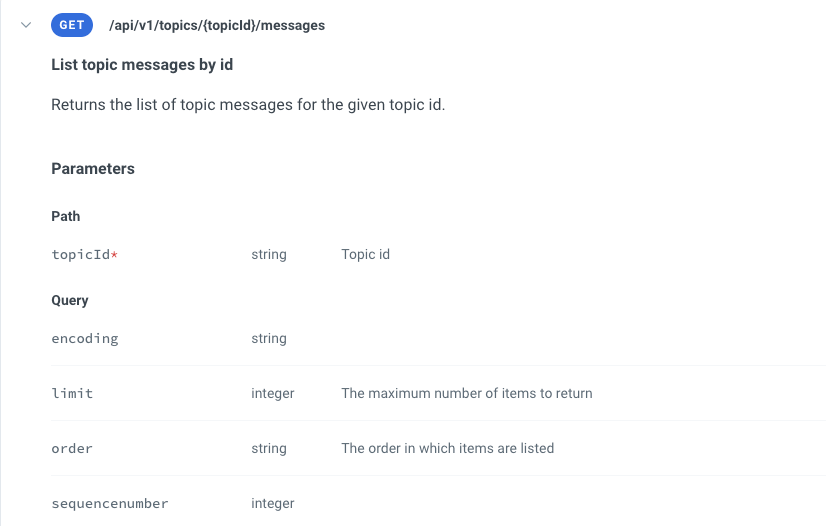 Execute the below request to retrieve the message with sequence number 2.
```
// Replace
https://testnet.mirrornode.hedera.com/api/v1/topics//messages?sequencenumber=2
// Example
https://testnet.mirrornode.hedera.com/api/v1/topics/0.0.4603900/messages?sequencenumber=2
```
Only message two is returned by the Hedera Mirror Node.
```json theme={null}
{
"links": { "next": null },
"messages": [
{
"consensus_timestamp": "1683553060.092158003",
"message": "TWVzc2FnZSAy",
"payer_account_id": "0.0.2617920",
"running_hash": "JM8LpmRwUVc+wiwzRHBgcCv8uJkbfan8BV2QPC0hBMgXA9KIvy8TwOoXsukgmeC+",
"running_hash_version": 3,
"sequence_number": 2,
"topic_id": "0.0.4603900"
}
]
}
```
***
## 4. Advanced filtering methods for HCS messages
This section explores advanced filtering methods using query modifiers. The [OpenAPI specification](https://raw.githubusercontent.com/hashgraph/hedera-mirror-node/main/hedera-mirror-rest/api/v1/openapi.yml) for the Hedera Mirror Node REST API shows all details for query parameters (e.g. `timestampQueryParam`).
Possible query modifiers are:
* Greater than (gt) / greater than or equal (gte)
* Lower than (lt) / lower than or equal (lte)
* Equal to (eq)
* Not equal to (ne)
You can use these modifiers for query parameters like `sequencenumber` and `timestamp` (consensus timestamp).
In this step, let's query all messages with a **sequence number greater than or equal to 2**. To do so, let's use the `gte` query parameter modifier and assign it the value 2, like this: `sequencenumber=gte:2`.
```
// Replace
https://testnet.mirrornode.hedera.com/api/v1/topics//messages?sequencenumber=gte:2
// Example
https://testnet.mirrornode.hedera.com/api/v1/topics/0.0.4603900/messages?sequencenumber=gte:2
```
Only message two is returned by the Hedera Mirror Node.
```json theme={null}
{
"links": { "next": null },
"messages": [
{
"consensus_timestamp": "1683553060.092158003",
"message": "TWVzc2FnZSAy",
"payer_account_id": "0.0.2617920",
"running_hash": "JM8LpmRwUVc+wiwzRHBgcCv8uJkbfan8BV2QPC0hBMgXA9KIvy8TwOoXsukgmeC+",
"running_hash_version": 3,
"sequence_number": 2,
"topic_id": "0.0.4603900"
},
{
"consensus_timestamp": "1683553060.328178003",
"message": "TWVzc2FnZSAz",
"payer_account_id": "0.0.2617920",
"running_hash": "OL6EUxAayPsRiuhwflX5heRgIGEWmHcJU7bS2qBPeJNoOiMQmaY0H6G/pXJ7wGQz",
"running_hash_version": 3,
"sequence_number": 3,
"topic_id": "0.0.4603900"
}
]
}
```
[GitHub](https://github.com/michielmulders) | [LinkedIn](https://www.linkedin.com/in/michielmulders/)
[GitHub](https://github.com/SimiHunjan) | [LinkedIn](https://www.linkedin.com/in/shunjan)
Execute the below request to retrieve the message with sequence number 2.
```
// Replace
https://testnet.mirrornode.hedera.com/api/v1/topics//messages?sequencenumber=2
// Example
https://testnet.mirrornode.hedera.com/api/v1/topics/0.0.4603900/messages?sequencenumber=2
```
Only message two is returned by the Hedera Mirror Node.
```json theme={null}
{
"links": { "next": null },
"messages": [
{
"consensus_timestamp": "1683553060.092158003",
"message": "TWVzc2FnZSAy",
"payer_account_id": "0.0.2617920",
"running_hash": "JM8LpmRwUVc+wiwzRHBgcCv8uJkbfan8BV2QPC0hBMgXA9KIvy8TwOoXsukgmeC+",
"running_hash_version": 3,
"sequence_number": 2,
"topic_id": "0.0.4603900"
}
]
}
```
***
## 4. Advanced filtering methods for HCS messages
This section explores advanced filtering methods using query modifiers. The [OpenAPI specification](https://raw.githubusercontent.com/hashgraph/hedera-mirror-node/main/hedera-mirror-rest/api/v1/openapi.yml) for the Hedera Mirror Node REST API shows all details for query parameters (e.g. `timestampQueryParam`).
Possible query modifiers are:
* Greater than (gt) / greater than or equal (gte)
* Lower than (lt) / lower than or equal (lte)
* Equal to (eq)
* Not equal to (ne)
You can use these modifiers for query parameters like `sequencenumber` and `timestamp` (consensus timestamp).
In this step, let's query all messages with a **sequence number greater than or equal to 2**. To do so, let's use the `gte` query parameter modifier and assign it the value 2, like this: `sequencenumber=gte:2`.
```
// Replace
https://testnet.mirrornode.hedera.com/api/v1/topics//messages?sequencenumber=gte:2
// Example
https://testnet.mirrornode.hedera.com/api/v1/topics/0.0.4603900/messages?sequencenumber=gte:2
```
Only message two is returned by the Hedera Mirror Node.
```json theme={null}
{
"links": { "next": null },
"messages": [
{
"consensus_timestamp": "1683553060.092158003",
"message": "TWVzc2FnZSAy",
"payer_account_id": "0.0.2617920",
"running_hash": "JM8LpmRwUVc+wiwzRHBgcCv8uJkbfan8BV2QPC0hBMgXA9KIvy8TwOoXsukgmeC+",
"running_hash_version": 3,
"sequence_number": 2,
"topic_id": "0.0.4603900"
},
{
"consensus_timestamp": "1683553060.328178003",
"message": "TWVzc2FnZSAz",
"payer_account_id": "0.0.2617920",
"running_hash": "OL6EUxAayPsRiuhwflX5heRgIGEWmHcJU7bS2qBPeJNoOiMQmaY0H6G/pXJ7wGQz",
"running_hash_version": 3,
"sequence_number": 3,
"topic_id": "0.0.4603900"
}
]
}
```
[GitHub](https://github.com/michielmulders) | [LinkedIn](https://www.linkedin.com/in/michielmulders/)
[GitHub](https://github.com/SimiHunjan) | [LinkedIn](https://www.linkedin.com/in/shunjan)