> ## Documentation Index
> Fetch the complete documentation index at: https://hedera-0c6e0218-mintlify-bc559771.mintlify.site/llms.txt
> Use this file to discover all available pages before exploring further.
# How to Set Up a Hedera Local Node
> Set up the Hedera local node with consensus node, mirror node, JSON-RPC relay, and tooling so you can develop and test Hedera apps fully offline.
**Hiero Local Node Deprecation (September 2026)**
Hiero Local Node is entering a 6-month deprecation period. Support ends September 2026. Migrate local testing and CI workflows to [Solo](https://solo.hiero.org/docs/) before then. [Learn more](https://hedera.com/blog/hiero-local-node-deprecation-6-month-transition-to-solo/).
The [**Hedera Local Node**](https://github.com/hashgraph/hedera-local-node) project enables developers to establish their own local network for development and testing. The local network comprises the consensus node, mirror node, [JSON-RPC relay](https://github.com/hashgraph/hedera-json-rpc-relay#readme), and other Hedera products, and can be set up using the CLI tool and Docker. This setup allows you to seamlessly build and deploy smart contracts from your local environment.
By the end of this tutorial, you'll be equipped to run a Hedera local node and generate keys, allowing you to test your projects and deploy projects in your local environment.
***
## Prerequisites
* [Node.js](https://nodejs.org/en) >= v14.x
* [NPM](https://docs.npmjs.com/downloading-and-installing-node-js-and-npm) >= v6.14.17
* Minimum 16GB RAM
* [Docker](https://www.docker.com/) >= v20.10.x
* [Docker Compose](https://docs.docker.com/compose/) >= v2.12.3
* Have Docker running on your machine with the correct configurations.
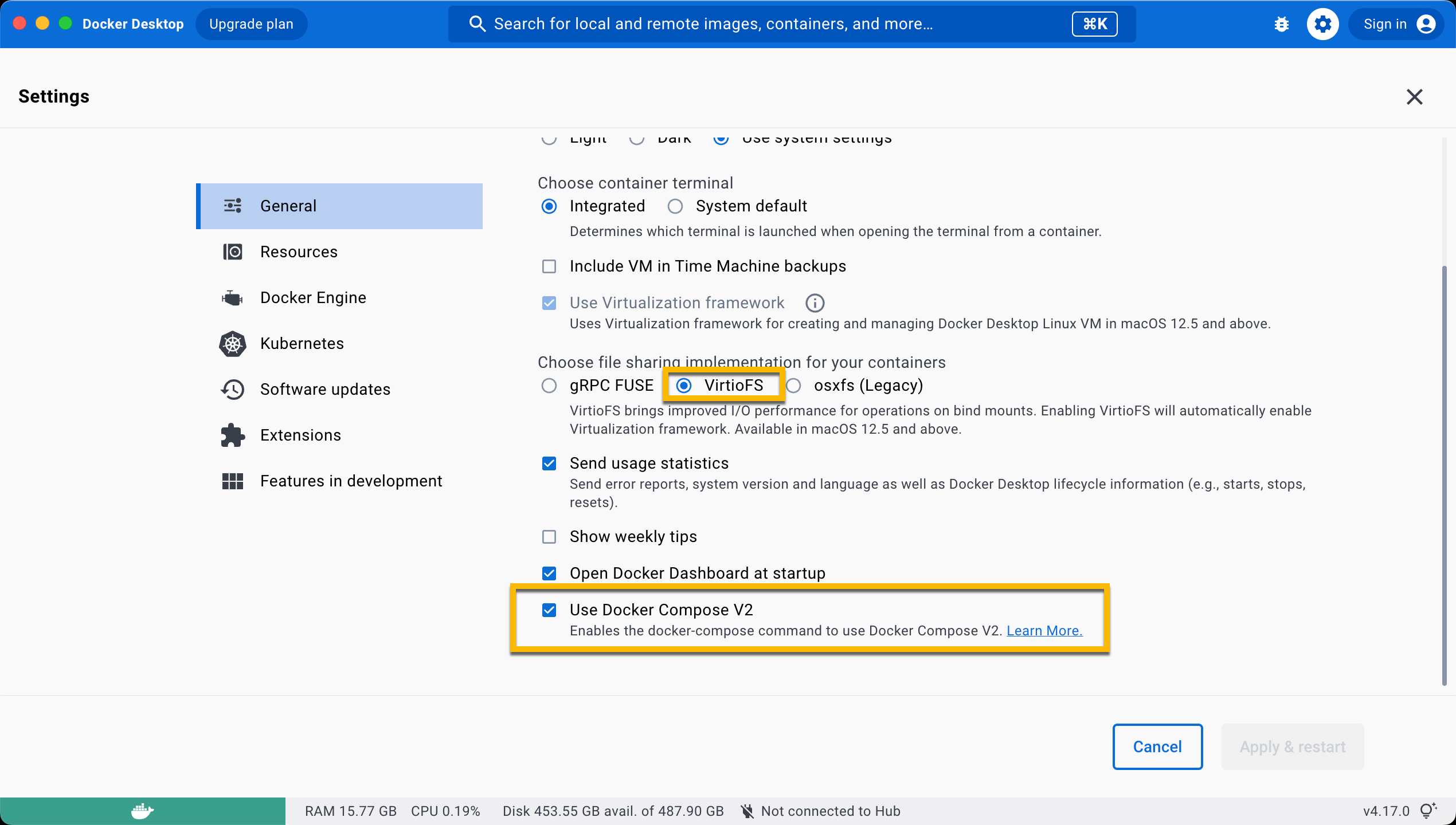
Ensure the **`VirtioFS`** file sharing implementation is enabled in the docker settings.
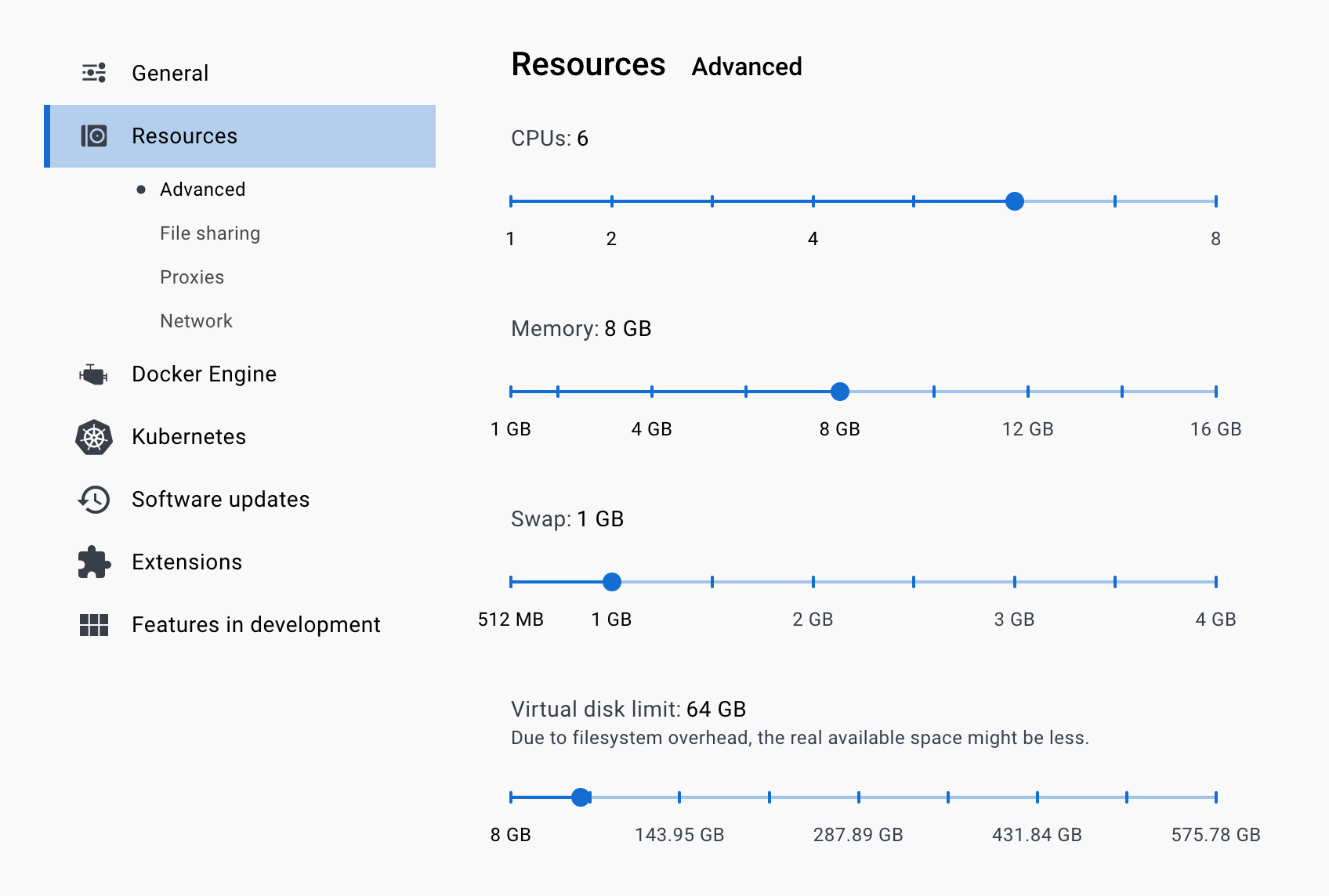
 Ensure the following configurations are set at minimum in Docker **Settings** -> **Resources** and are available for use:
* **CPUs:** 6
* **Memory:** 8GB
* **Swap:** 1 GB
* **Disk Image Size:** 64 GB
Ensure the following configurations are set at minimum in Docker **Settings** -> **Resources** and are available for use:
* **CPUs:** 6
* **Memory:** 8GB
* **Swap:** 1 GB
* **Disk Image Size:** 64 GB
 Ensure the **`Allow the default Docker sockets to be used (requires password)`** is enabled in Docker **Settings -> Advanced**.
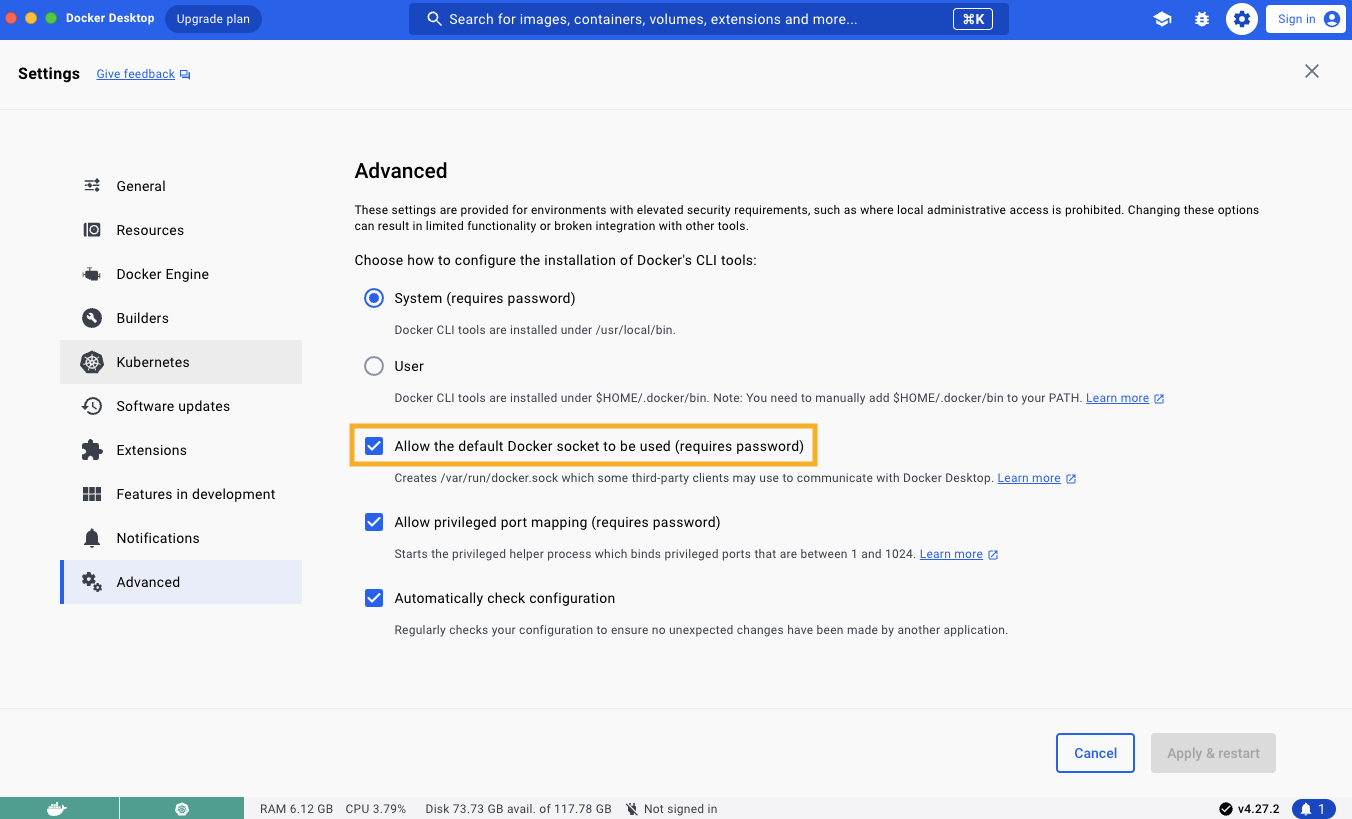 **Note:** The image may look different if you are on a different version
*Local node can be run using Docker or NPM but we will use Docker for this tutorial. *[Here](https://github.com/hashgraph/hedera-local-node#official-npm-release)* are the installation steps for NPM.*
***
## Table of Contents
1. [Start Your Local Network](#start-your-local-network)
2. [Generate Keys](#generate-keys)
3. [Stop Your Local Network](#stop-your-local-network)
4. [Additional Resources](#additional-resources)
***
## Start Your Local Network
Open a new terminal and navigate to your preferred directory where your Hedera Local Node project will live. Run the following command to clone the repo and install dependencies to your local machine:
```bash theme={null}
git clone https://github.com/hashgraph/hedera-local-node.git
cd hedera-local-node
npm install
```
For Windows users: You will need to update the file endings of `compose-network/mirror-node/init.sh` by running this in WSL:
```bash theme={null}
dos2unix compose-network/mirror-node/init.sh
```
Ensure Docker is installed and open on your machine before running this command to get the network up and running:
```bash theme={null}
// starts and generates the first 30 accounts
npm run start -- -d
or
// will start local node but will not generate the first 30 accounts
docker compose up -d
```
***
## Generate Keys
To generate accounts with random private keys, run the `generate-accounts` command. Specify the number of accounts generated by appending the number to the `hedera generate-account` command. For example, to generate 5 accounts, run `hedera generate-accounts 5`.
```
Generating accounts in synchronous mode...
|-----------------------------------------------------------------------------------------|
|-----------------------------| Accounts list ( ECDSA keys) |----------------------------|
|-----------------------------------------------------------------------------------------|
| id | private key | balance |
|-----------------------------------------------------------------------------------------|
| 0.0.1033 - 0xced34a00d3fff542e350a5e61cb41509812bf23ea581f83a0a862c94d8c69704 - 10000 ℏ |
| 0.0.1034 - 0xa4189ab682ba43925ce654ca09800bba86cf8b1b7f889006d5170d95f4fed365 - 10000 ℏ |
| 0.0.1035 - 0xf9106e9841677136c9cbe8c114dab80470ca62a15bfe9c777006bcb114288c22 - 10000 ℏ |
| 0.0.1036 - 0xe3517a9235971be1e1f95e791f3ffd7d753a652799fa11f1ace626036c4db275 - 10000 ℏ |
| 0.0.1037 - 0x636926cf2f6f9fd0a58043c600390eeef0bbed9d4b8a113ea68a8d67f922d04e - 10000 ℏ |
|-----------------------------------------------------------------------------------------|
|--------------------------------------------------------------------------------------------------------------------------------------|
|------------------------------------------------| Accounts list (Alias ECDSA keys) |--------------------------------------------------|
|--------------------------------------------------------------------------------------------------------------------------------------|
| id | public address | private key | balance |
|--------------------------------------------------------------------------------------------------------------------------------------|
| 0.0.1038 - 0xaBE90e20f394629e054Bc1E8F1338Fe8ea94F0b5 - 0x444913bd258f764e62db6c87abde7ca52ec22985db8c91b8c3b2b4f2c51775f0 - 10000 ℏ |
| 0.0.1039 - 0x26d941d8E1f6bF9B0F7e5156fA6ff02acEd0DF3E - 0xea25f427caf7029989669f93926b7902dde5361b176b4bc17b8ec0a967beaa0b - 10000 ℏ |
| 0.0.1040 - 0x64001c2d1f3a8d3574435B4F125944018E2E584D - 0xf2deb678a1e67e288d8a128334f41c890e7600b2a5471ecc9a3af4824e3021b7 - 10000 ℏ |
| 0.0.1041 - 0x6bE22CD9D16b64969683B74897E4EBB30c7c30E8 - 0xb9c2480cdbdddb2ecd6e032b87820c29e8791ad4f53b89f829269d856c835819 - 10000 ℏ |
| 0.0.1042 - 0x992d8aD211b28B23589c0b3Fe30de6C90662C4aB - 0x7e8bb0d85a8d80fa2eb2c9f6bd5c9b1a2c2f9f6992c7fffd201c8e81f0ec0000 - 10000 ℏ |
|--------------------------------------------------------------------------------------------------------------------------------------|
|-----------------------------------------------------------------------------------------|
|-----------------------------| Accounts list (ED25519 keys) |----------------------------|
|-----------------------------------------------------------------------------------------|
| id | private key | balance |
|-----------------------------------------------------------------------------------------|
| 0.0.1043 - 0xd4917e152ca922b8bfbafffc3486512ae25ec0a75b05c44f517b11cd12fd949b - 10000 ℏ |
| 0.0.1044 - 0xbaeec69382fbb43e4d521b3d8717c9cba610a1fbcaededaaf4408c3138a683ae - 10000 ℏ |
| 0.0.1045 - 0x1f5c4b2efd3c36d29e9d2e16a825abd001f99bff2388bb8c6011cd5f956023c9 - 10000 ℏ |
| 0.0.1046 - 0x1976acdd5e71ce7e8db4cb0aa112fa1c16876155f0f20b9b7029916073f1d67f - 10000 ℏ |
| 0.0.1047 - 0x6e29f48b11ffc77e277f0500d607b35956da58f1ed30aad003fb1846bfffc483 - 10000 ℏ |
|-----------------------------------------------------------------------------------------|
```
**Please note**: Since the first 10 accounts generated are with predefined private keys, if you need 5 generated with random keys, you will run `hedera start 15`. The same rule applies when you use the `hedera generate-accounts` command.
Grab any of the account private keys generated from the ***Alias ECDSA keys Accounts list***. This will be used as the `LOCAL_NODE_OPERATOR_PRIVATE_KEY` environment variable value in your `.env` file of your project.
***
## Stop Your Local Network
To stop your local node, you can run the `hedera stop` command. If you want to keep any files created manually in the working directory, please save them before executing this command.
```
Stopping the network...
Stopping the docker containers...
Cleaning the volumes and temp files...
```
Alternatively, run `docker compose down -v; git clean -xfd; git reset --hard` to stop the local node and reset it to its original state.
```bash theme={null}
[+] Running 27/27
✔ Container mirror-node-web3 Removed 3.5s
✔ Container json-rpc-relay-ws Removed 10.8s
✔ Container mirror-node-monitor Removed 3.7s
✔ Container relay-cache Removed 0.9s
✔ Container prometheus Removed 0.9s
✔ Container record-sidecar-uploader Removed 0.0s
✔ Container grafana Removed 0.9s
✔ Container hedera-explorer Removed 10.4s
✔ Container json-rpc-relay Removed 10.7s
✔ Container account-balances-uploader Removed 0.1s
✔ Container envoy-proxy Removed 1.0s
✔ Container mirror-node-grpc Removed 2.7s
✔ Container mirror-node-rest Removed 10.4s
✔ Container network-node Removed 10.8s
✔ Container mirror-node-importer Removed 10.4s
✔ Container record-streams-uploader Removed 0.0s
✔ Container haveged Removed 0.0s
✔ Container mirror-node-db Removed 0.3s
✔ Container minio Removed 0.0s
✔ Volume prometheus-data Removed 0.0s
✔ Volume minio-data Removed 0.0s
✔ Volume mirror-node-postgres Removed 0.1s
✔ Volume grafana-data Removed 0.2s
✔ Network network-node-bridge Removed 0.1s
✔ Network hedera-local-node_default Removed 0.2s
✔ Network cloud-storage Removed 0.2s
✔ Network mirror-node Removed 0.2s
Removing .husky/_/
Removing network-logs/
Removing node_modules/
HEAD is now at ......
```
***📣 Note**: All available commands can be checked out* [*here*](https://github.com/hashgraph/hedera-local-node/tree/main?tab=readme-ov-file#using-hedera-local)*.*
***
## Additional Resources
**➡** [**Hedera Local Node Repository**](https://github.com/hashgraph/hedera-local-node#readme)
**➡** [**Hedera Local Node CLI Tool Commands**](https://github.com/hashgraph/hedera-local-node#using-hedera-local)
**➡** [**Hedera Local Node Docker Setup** ](https://www.youtube.com/watch?v=KOhzu6ftmbY)**\[Video Tutorial]**
**Note:** The image may look different if you are on a different version
*Local node can be run using Docker or NPM but we will use Docker for this tutorial. *[Here](https://github.com/hashgraph/hedera-local-node#official-npm-release)* are the installation steps for NPM.*
***
## Table of Contents
1. [Start Your Local Network](#start-your-local-network)
2. [Generate Keys](#generate-keys)
3. [Stop Your Local Network](#stop-your-local-network)
4. [Additional Resources](#additional-resources)
***
## Start Your Local Network
Open a new terminal and navigate to your preferred directory where your Hedera Local Node project will live. Run the following command to clone the repo and install dependencies to your local machine:
```bash theme={null}
git clone https://github.com/hashgraph/hedera-local-node.git
cd hedera-local-node
npm install
```
For Windows users: You will need to update the file endings of `compose-network/mirror-node/init.sh` by running this in WSL:
```bash theme={null}
dos2unix compose-network/mirror-node/init.sh
```
Ensure Docker is installed and open on your machine before running this command to get the network up and running:
```bash theme={null}
// starts and generates the first 30 accounts
npm run start -- -d
or
// will start local node but will not generate the first 30 accounts
docker compose up -d
```
***
## Generate Keys
To generate accounts with random private keys, run the `generate-accounts` command. Specify the number of accounts generated by appending the number to the `hedera generate-account` command. For example, to generate 5 accounts, run `hedera generate-accounts 5`.
```
Generating accounts in synchronous mode...
|-----------------------------------------------------------------------------------------|
|-----------------------------| Accounts list ( ECDSA keys) |----------------------------|
|-----------------------------------------------------------------------------------------|
| id | private key | balance |
|-----------------------------------------------------------------------------------------|
| 0.0.1033 - 0xced34a00d3fff542e350a5e61cb41509812bf23ea581f83a0a862c94d8c69704 - 10000 ℏ |
| 0.0.1034 - 0xa4189ab682ba43925ce654ca09800bba86cf8b1b7f889006d5170d95f4fed365 - 10000 ℏ |
| 0.0.1035 - 0xf9106e9841677136c9cbe8c114dab80470ca62a15bfe9c777006bcb114288c22 - 10000 ℏ |
| 0.0.1036 - 0xe3517a9235971be1e1f95e791f3ffd7d753a652799fa11f1ace626036c4db275 - 10000 ℏ |
| 0.0.1037 - 0x636926cf2f6f9fd0a58043c600390eeef0bbed9d4b8a113ea68a8d67f922d04e - 10000 ℏ |
|-----------------------------------------------------------------------------------------|
|--------------------------------------------------------------------------------------------------------------------------------------|
|------------------------------------------------| Accounts list (Alias ECDSA keys) |--------------------------------------------------|
|--------------------------------------------------------------------------------------------------------------------------------------|
| id | public address | private key | balance |
|--------------------------------------------------------------------------------------------------------------------------------------|
| 0.0.1038 - 0xaBE90e20f394629e054Bc1E8F1338Fe8ea94F0b5 - 0x444913bd258f764e62db6c87abde7ca52ec22985db8c91b8c3b2b4f2c51775f0 - 10000 ℏ |
| 0.0.1039 - 0x26d941d8E1f6bF9B0F7e5156fA6ff02acEd0DF3E - 0xea25f427caf7029989669f93926b7902dde5361b176b4bc17b8ec0a967beaa0b - 10000 ℏ |
| 0.0.1040 - 0x64001c2d1f3a8d3574435B4F125944018E2E584D - 0xf2deb678a1e67e288d8a128334f41c890e7600b2a5471ecc9a3af4824e3021b7 - 10000 ℏ |
| 0.0.1041 - 0x6bE22CD9D16b64969683B74897E4EBB30c7c30E8 - 0xb9c2480cdbdddb2ecd6e032b87820c29e8791ad4f53b89f829269d856c835819 - 10000 ℏ |
| 0.0.1042 - 0x992d8aD211b28B23589c0b3Fe30de6C90662C4aB - 0x7e8bb0d85a8d80fa2eb2c9f6bd5c9b1a2c2f9f6992c7fffd201c8e81f0ec0000 - 10000 ℏ |
|--------------------------------------------------------------------------------------------------------------------------------------|
|-----------------------------------------------------------------------------------------|
|-----------------------------| Accounts list (ED25519 keys) |----------------------------|
|-----------------------------------------------------------------------------------------|
| id | private key | balance |
|-----------------------------------------------------------------------------------------|
| 0.0.1043 - 0xd4917e152ca922b8bfbafffc3486512ae25ec0a75b05c44f517b11cd12fd949b - 10000 ℏ |
| 0.0.1044 - 0xbaeec69382fbb43e4d521b3d8717c9cba610a1fbcaededaaf4408c3138a683ae - 10000 ℏ |
| 0.0.1045 - 0x1f5c4b2efd3c36d29e9d2e16a825abd001f99bff2388bb8c6011cd5f956023c9 - 10000 ℏ |
| 0.0.1046 - 0x1976acdd5e71ce7e8db4cb0aa112fa1c16876155f0f20b9b7029916073f1d67f - 10000 ℏ |
| 0.0.1047 - 0x6e29f48b11ffc77e277f0500d607b35956da58f1ed30aad003fb1846bfffc483 - 10000 ℏ |
|-----------------------------------------------------------------------------------------|
```
**Please note**: Since the first 10 accounts generated are with predefined private keys, if you need 5 generated with random keys, you will run `hedera start 15`. The same rule applies when you use the `hedera generate-accounts` command.
Grab any of the account private keys generated from the ***Alias ECDSA keys Accounts list***. This will be used as the `LOCAL_NODE_OPERATOR_PRIVATE_KEY` environment variable value in your `.env` file of your project.
***
## Stop Your Local Network
To stop your local node, you can run the `hedera stop` command. If you want to keep any files created manually in the working directory, please save them before executing this command.
```
Stopping the network...
Stopping the docker containers...
Cleaning the volumes and temp files...
```
Alternatively, run `docker compose down -v; git clean -xfd; git reset --hard` to stop the local node and reset it to its original state.
```bash theme={null}
[+] Running 27/27
✔ Container mirror-node-web3 Removed 3.5s
✔ Container json-rpc-relay-ws Removed 10.8s
✔ Container mirror-node-monitor Removed 3.7s
✔ Container relay-cache Removed 0.9s
✔ Container prometheus Removed 0.9s
✔ Container record-sidecar-uploader Removed 0.0s
✔ Container grafana Removed 0.9s
✔ Container hedera-explorer Removed 10.4s
✔ Container json-rpc-relay Removed 10.7s
✔ Container account-balances-uploader Removed 0.1s
✔ Container envoy-proxy Removed 1.0s
✔ Container mirror-node-grpc Removed 2.7s
✔ Container mirror-node-rest Removed 10.4s
✔ Container network-node Removed 10.8s
✔ Container mirror-node-importer Removed 10.4s
✔ Container record-streams-uploader Removed 0.0s
✔ Container haveged Removed 0.0s
✔ Container mirror-node-db Removed 0.3s
✔ Container minio Removed 0.0s
✔ Volume prometheus-data Removed 0.0s
✔ Volume minio-data Removed 0.0s
✔ Volume mirror-node-postgres Removed 0.1s
✔ Volume grafana-data Removed 0.2s
✔ Network network-node-bridge Removed 0.1s
✔ Network hedera-local-node_default Removed 0.2s
✔ Network cloud-storage Removed 0.2s
✔ Network mirror-node Removed 0.2s
Removing .husky/_/
Removing network-logs/
Removing node_modules/
HEAD is now at ......
```
***📣 Note**: All available commands can be checked out* [*here*](https://github.com/hashgraph/hedera-local-node/tree/main?tab=readme-ov-file#using-hedera-local)*.*
***
## Additional Resources
**➡** [**Hedera Local Node Repository**](https://github.com/hashgraph/hedera-local-node#readme)
**➡** [**Hedera Local Node CLI Tool Commands**](https://github.com/hashgraph/hedera-local-node#using-hedera-local)
**➡** [**Hedera Local Node Docker Setup** ](https://www.youtube.com/watch?v=KOhzu6ftmbY)**\[Video Tutorial]**