> ## Documentation Index
> Fetch the complete documentation index at: https://hedera-0c6e0218-mintlify-bc559771.mintlify.site/llms.txt
> Use this file to discover all available pages before exploring further.
# Verifying Smart Contracts
> Verify deployed Hedera smart contracts with Sourcify so HashScan and mirror node explorers display matched source code and metadata.
Smart contract verification is the process of verifying that the smart contract bytecode uploaded to the network matches the expected smart contract source files. Verification is *not* required for contracts deployed on the Hedera network, but it is best practice and essential to maintaining the contract's security and integrity by identifying vulnerabilities that could be exploited, as smart contracts are immutable once deployed. It also enables transparency and builds trust within the user community by proving that the deployed bytecode matches the contract's original source code.
Hedera Mainnet and Testnet are natively supported by [Sourcify](/support/glossary#sourcify), the open-source Solidity source code and metadata verification service hosted at [sourcify.dev](https://sourcify.dev). To verify a contract, submit your source files and metadata to Sourcify (directly via the web UI, the [v2 API](https://docs.sourcify.dev/docs/api/), or through your build tooling). Sourcify recompiles the submitted sources and compares them to the deployed bytecode. If a match is found, the contract's verification status is updated to either a [*Full (Perfect) Match*](https://docs.sourcify.dev/docs/full-vs-partial-match/#full-perfect-matches) or a [*Partial Match*](https://docs.sourcify.dev/docs/full-vs-partial-match/#partial-matches)*.*
Once a contract is verified on Sourcify, [HashScan](https://hashscan.io/) and other community-hosted Hedera Mirror Node Explorers read its verification status directly from Sourcify and surface it to users. To learn what differentiates a *Full (Perfect) Match* from a *Partial Match*, check out the Sourcify documentation [here](https://docs.sourcify.dev/docs/full-vs-partial-match/).
**Note**: Manual HashScan verification is temporarily disabled. Verify your contracts directly at [sourcify.dev](https://sourcify.dev) or through Foundry/Hardhat. Once verified there, the status will appear on HashScan automatically.
For verification, you will need the following items:
**➡** [**Smart Contract Source Code**](#smart-contract-source-code)
**➡** [**The Metadata File**](#the-metadata-file)
**➡** [**Deployed Smart Contract Address**](#deployed-smart-contract-address)
***
## Smart Contract Source Code
This is the actual code for your smart contract written in Solidity. The source code includes all the contract's functions, variables, and logic. It's crucial for the verification process, where the deployed bytecode is compared to the compiled bytecode of this source code.
#### Example:
A simple `HelloWorld` Solidity smart contract:
```solidity theme={null}
pragma solidity ^0.8.17;
contract HelloWorld {
// the contract's owner, set in the constructor
address owner;
// the message we're storing, set in the constructor
string message;
constructor(string memory message_) {
// set the owner of the contract for 'kill()'
owner = msg.sender;
message = message_;
}
function set_message(string memory message_) public {
// only allow the owner to update the message
if (msg.sender != owner) return;
message = message_;
}
// return a string
function get_message() public view returns (string memory) {
return message;
}
}
```
***
## The Metadata File
When you compile a Solidity smart contract, it generates a JSON metadata file. This file contains settings used when the smart contract was originally compiled. These settings can include the compiler version, optimization details, and more. The metadata file is crucial for ensuring that the bytecode generated during verification matches the deployed bytecode.
> *Metadata is not part of the EVM spec because it's handled externally by compilers and tools like Sourcify. See Sourcify's Metadata documentation* [*here*](https://docs.sourcify.dev/docs/metadata/#metadata)*.*
You have options for generating the metadata file. The recommended skill levels for each option are in parentheses. Choose the option that best fits your experience with smart contracts:
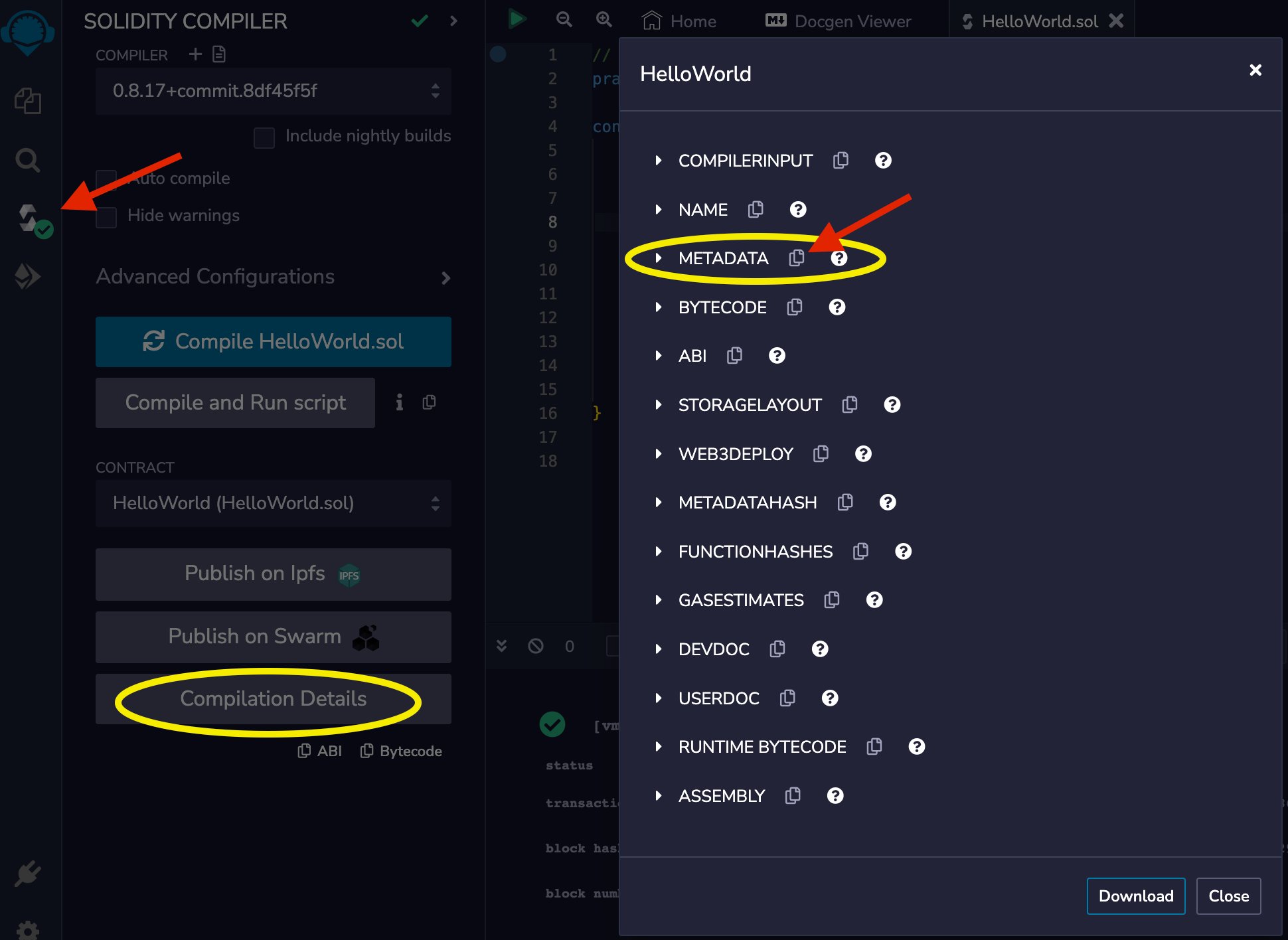
To create a metadata file in Remix, compile your smart contract and the compiled artifacts will be saved in the `artifacts/` directory and the `.json` metadata file will be under `artifacts/build-info` and used for verification. Alternatively, you can copy and paste it from the Solidity compiler tab. Please see the image below.
 See the Remix IDE docs for more detailed documentation [here](https://remix-ide.readthedocs.io/en/latest/contract_metadata.html).
**Note:** Taking the bytecode and metadata from Remix and then deploying that on Hedera results in a ***full (perfect) match***. Taking the bytecode and metadata from Remix *after* deploying the contract on Hedera results in a ***partial match*** or ***The deployed and recompiled bytecode don't match*** error. *The requirement for verification with a contract compiled in Remix is just the smart contract's Solidity file.*
To create the `.json` metadata file with Hardhat, compile the contract using the `npx hardhat compile` command. The compiled artifacts will be saved in the `artifacts/` directory and the `.json` metadata file will be under `artifacts/build-info` and used for verification. See Sourcify Hardhat metadata documentation [here](https://docs.sourcify.dev/docs/metadata/#hardhat).
See the Remix IDE docs for more detailed documentation [here](https://remix-ide.readthedocs.io/en/latest/contract_metadata.html).
**Note:** Taking the bytecode and metadata from Remix and then deploying that on Hedera results in a ***full (perfect) match***. Taking the bytecode and metadata from Remix *after* deploying the contract on Hedera results in a ***partial match*** or ***The deployed and recompiled bytecode don't match*** error. *The requirement for verification with a contract compiled in Remix is just the smart contract's Solidity file.*
To create the `.json` metadata file with Hardhat, compile the contract using the `npx hardhat compile` command. The compiled artifacts will be saved in the `artifacts/` directory and the `.json` metadata file will be under `artifacts/build-info` and used for verification. See Sourcify Hardhat metadata documentation [here](https://docs.sourcify.dev/docs/metadata/#hardhat).
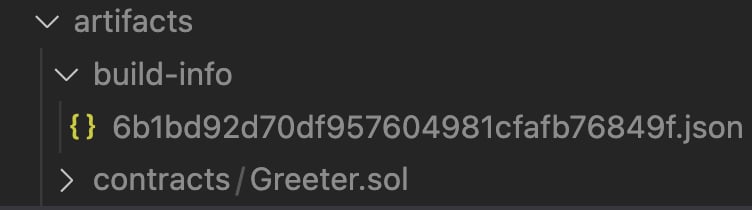 **Note**: The requirement for verification with a contract compiled with Hardhat is only the `build-info` JSON file.
To create the metadata file with Foundry, compile the contract using the `forge build` command. The compilation outputs to `out/CONTRACT_NAME` folder. The `.json` file contains the metadata of the contract under `"rawMetadata"` and `"metadata"` fields. However, you don't need to extract the metadata manually for verification. See Sourcify Foundry metadata documentation [here](https://docs.sourcify.dev/docs/metadata/#foundry).
**Note**: The requirement for verification with a contract compiled with Hardhat is only the `build-info` JSON file.
To create the metadata file with Foundry, compile the contract using the `forge build` command. The compilation outputs to `out/CONTRACT_NAME` folder. The `.json` file contains the metadata of the contract under `"rawMetadata"` and `"metadata"` fields. However, you don't need to extract the metadata manually for verification. See Sourcify Foundry metadata documentation [here](https://docs.sourcify.dev/docs/metadata/#foundry).
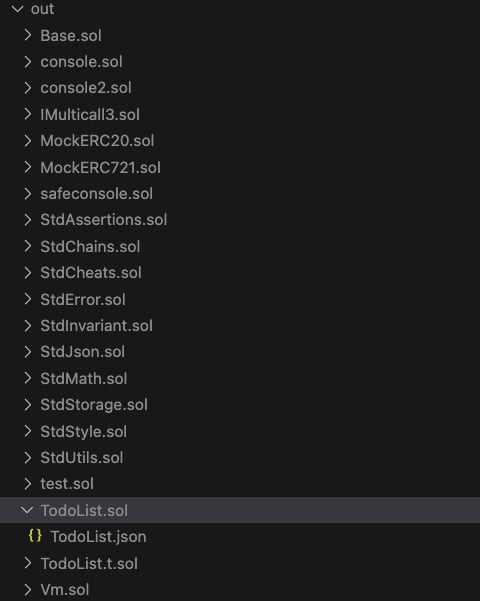 **Note**: The requirements for verification with a contract compiled with Foundry are both the `.json` metadata and the Solidity source file.
You can pass the `--metadata` flag to the Solidity command line compiler to get the metadata output printed.
```
solc --metadata contracts/HelloWorld.sol
```
Write the metadata into a file with
```
solc --metadata contracts/HelloWorld.sol > metadata.json
```
**Note:`solc` vs. `solcjs`**
**📣** `solcjs` will not generate the metadata using the `--metadata` flag. The option is only supported in `solc`.
An example metadata file for the `HelloWorld` smart contract:
```json theme={null}
{
"compiler": "0.8.17",
"language": "Solidity",
"abi": [
{
"inputs": [
{
"internalType": "string",
"name": "message_",
"type": "string"
}
],
"stateMutability": "nonpayable",
"type": "constructor"
},
{
"inputs": [],
"name": "get_message",
"outputs": [
{
"internalType": "string",
"name": "",
"type": "string"
}
],
"stateMutability": "view",
"type": "function"
},
{
"inputs": [
{
"internalType": "string",
"name": "message_",
"type": "string"
}
],
"name": "set_message",
"outputs": [],
"stateMutability": "nonpayable",
"type": "function"
}
]
}
```
***
## Deployed Smart Contract Address
Even though Hedera uses the `0.0.XXXXXXX` account ID format, it accommodates Ethereum's address format for EVM compatibility. Once your smart contract is deployed on Hedera's network, you'll receive an address like the one below. This serves as your deployed smart contract address.
#### Example:
An example deployed EVM smart contract address:
```
0x403925982ef5a6461daba0a103bd6be20b9c4216
```
***Note**: The `0.0.XXXXXXX` smart contract address format can not be used in the verification process.*
***
## Verify Your Smart Contract
Verify your contract directly at [sourcify.dev](https://sourcify.dev), via the [Sourcify v2 API](/reference/verification-api), or through Foundry / Hardhat tooling:
***
## Additional Resources
**➡** [**Sourcify Docs**](https://docs.sourcify.dev/docs/intro)
**➡** [**Smart Contract Verification API**](/reference/verification-api)
**➡** [**HashScan Network Explorer**](https://hashscan.io/)
**➡** [**Sourcify Verification UI**](https://sourcify.dev)
**➡** [**Full vs Partial Match Docs**](https://docs.sourcify.dev/docs/full-vs-partial-match/)
**➡** [**Hardhat Documentation**](https://hardhat.org/hardhat-runner/docs/guides/compile-contracts)
**➡** [**Solidity Documentation**](https://docs.soliditylang.org/en/v0.8.23/)
**Note**: The requirements for verification with a contract compiled with Foundry are both the `.json` metadata and the Solidity source file.
You can pass the `--metadata` flag to the Solidity command line compiler to get the metadata output printed.
```
solc --metadata contracts/HelloWorld.sol
```
Write the metadata into a file with
```
solc --metadata contracts/HelloWorld.sol > metadata.json
```
**Note:`solc` vs. `solcjs`**
**📣** `solcjs` will not generate the metadata using the `--metadata` flag. The option is only supported in `solc`.
An example metadata file for the `HelloWorld` smart contract:
```json theme={null}
{
"compiler": "0.8.17",
"language": "Solidity",
"abi": [
{
"inputs": [
{
"internalType": "string",
"name": "message_",
"type": "string"
}
],
"stateMutability": "nonpayable",
"type": "constructor"
},
{
"inputs": [],
"name": "get_message",
"outputs": [
{
"internalType": "string",
"name": "",
"type": "string"
}
],
"stateMutability": "view",
"type": "function"
},
{
"inputs": [
{
"internalType": "string",
"name": "message_",
"type": "string"
}
],
"name": "set_message",
"outputs": [],
"stateMutability": "nonpayable",
"type": "function"
}
]
}
```
***
## Deployed Smart Contract Address
Even though Hedera uses the `0.0.XXXXXXX` account ID format, it accommodates Ethereum's address format for EVM compatibility. Once your smart contract is deployed on Hedera's network, you'll receive an address like the one below. This serves as your deployed smart contract address.
#### Example:
An example deployed EVM smart contract address:
```
0x403925982ef5a6461daba0a103bd6be20b9c4216
```
***Note**: The `0.0.XXXXXXX` smart contract address format can not be used in the verification process.*
***
## Verify Your Smart Contract
Verify your contract directly at [sourcify.dev](https://sourcify.dev), via the [Sourcify v2 API](/reference/verification-api), or through Foundry / Hardhat tooling:
***
## Additional Resources
**➡** [**Sourcify Docs**](https://docs.sourcify.dev/docs/intro)
**➡** [**Smart Contract Verification API**](/reference/verification-api)
**➡** [**HashScan Network Explorer**](https://hashscan.io/)
**➡** [**Sourcify Verification UI**](https://sourcify.dev)
**➡** [**Full vs Partial Match Docs**](https://docs.sourcify.dev/docs/full-vs-partial-match/)
**➡** [**Hardhat Documentation**](https://hardhat.org/hardhat-runner/docs/guides/compile-contracts)
**➡** [**Solidity Documentation**](https://docs.soliditylang.org/en/v0.8.23/)